NPM package
The NPM package is the half that generates the documentation. It reads the manifest from the site, screenshots each pattern in a headless Playwright browser, and writes an index plus one Markdown page per category.
npm install -D @humanmade/wp-pattern-library
Or run it without installing: npx @humanmade/wp-pattern-library build.
It talks to the site over HTTP, so it doesn’t care whether that site is localhost:8888 or www.example.com — and it doesn’t need to run on the same machine. The site itself never needs Node.
Commands
pattern-library build       # Capture screenshots, then write Markdown. The default.
pattern-library capture     # Screenshots only.
pattern-library generate    # Markdown only, from screenshots already on disk.
pattern-library manifest    # Print the filtered manifest as JSON.
| Flag | Effect |
|---|---|
--dry-run |
Report what would be included; write nothing, start no browser. |
--site=<url> |
Override PATTERN_LIBRARY_SITE. |
--output-dir=<path> |
Override outputDir. |
Any other --key=value overrides the matching config key, converted from kebab-case to camelCase.
A bare argument filters patterns by basename substring:
pattern-library build hero          # Every pattern with "hero" in its name.
pattern-library capture hero card   # Either.
The filter affects what gets captured. Markdown is always written for the whole library, so a filtered run doesn’t truncate the pages — patterns without a screenshot on disk are marked “Preview pending”.
Some combinations worth knowing:
# Re-shoot one pattern after changing it.
pattern-library capture hero-podcast

# Rebuild the Markdown after changing config, without re-capturing anything.
pattern-library generate

# Inspect what the site is actually reporting.
pattern-library manifest | jq '.patterns[].name'
generate is the fast loop when you’re tuning classify(), extraFields or title. It reuses the screenshots on disk and takes about a second.
Reading the run summary
120 written, 45 unchanged, 2 empty, 1 failed.
- written — the screenshot’s bytes changed, so the file was rewritten.
- unchanged — byte-identical to what was on disk, so it’s left alone and doesn’t churn in your diff.
- empty — the pattern rendered nothing. Usually a query-loop item template needing post context.
- failed — the capture errored. The run exits non-zero.
The summary also reports missing resources — images, fonts and scripts a pattern referenced that failed to load. A hero whose background image 404s renders “successfully” and previews wrong, so this is worth reading.
Configuration
The generator reads pattern-library.config.js (or .mjs) from the directory you run it in. It’s a real ES module, so values can be computed and options that take a function get one.
Credentials never belong in this file — anything you put there is committed. Precedence, lowest to highest: defaults → config file → environment → CLI flags.
| Key | Default | What it does |
|---|---|---|
title |
Pattern Library |
Heading on the index page. |
namespaces |
[] (all) |
Pattern-name prefixes to include. |
outputDir |
docs/pattern-library |
Where pages and screenshots are written. |
indexFile |
<outputDir>/README.md |
Index path. |
screenshotsDir |
<outputDir>/screenshots |
Screenshot path. |
imageFormat |
webp |
webp, avif, jpeg or png. |
imageQuality |
80 |
Ignored for png. |
defaultViewport |
1440 |
Used when a pattern declares no Viewport Width. |
captureTimeout |
30000 |
Milliseconds to wait for one capture. |
exclude |
see below | What to leave out. |
postTypeContext |
{} |
Basename → post type, for query-loop item templates. |
classify |
flat | Where each category’s page goes. |
animations |
[ 'aos' ] |
Animation libraries to settle before capture. |
extraFields |
[] |
Extra metadata lines per pattern. |
variants |
[] |
Extra captures inside a section wrapper. |
baseLabel |
Default rendering |
Caption on the plain capture of a pattern that has variants. |
includeSkipped |
true |
List excluded patterns, with reasons, on the index. |
placeholderImages |
true |
Placeholder featured image for posts that have none. |
extraHeaders |
{} |
Headers sent with every request to the site. |
Credentials and the site URL come from the environment:
| Variable | Purpose |
|---|---|
PATTERN_LIBRARY_SITE |
Origin of the site to capture from. |
PATTERN_LIBRARY_WP_USER |
Login holding view_pattern_library. |
PATTERN_LIBRARY_WP_APP_PASSWORD |
That user’s application password. |
PATTERN_LIBRARY_EXTRA_HEADERS |
Extra headers, one Name: value per line. |
Exclusions
exclude: {
	inserterHidden: true,
	postTypes: [ 'wp_template', 'wp_template_part' ],
	patterns: [], // Exact pattern names.
}
The defaults skip patterns hidden from the inserter, and those scoped to wp_template / wp_template_part — a template part rendered on its own is meaningless.
Partial overrides merge with the defaults, so this only adds to the list:
exclude: {
	patterns: [ 'my-theme/work-in-progress' ],
}
Excluded patterns still appear on the index under Not included, with the reason. Set includeSkipped: false to suppress that.
Patterns that render empty
A pattern built as a query-loop item template — a person card, a post card — has nothing to bind to when rendered alone. Its post-title and post-content blocks resolve against whatever the global query happens to be, which is nothing, so it captures as an empty box.
Give it a post type, keyed by basename:
postTypeContext: {
	'person-card': 'person',
	'card-post': 'post',
}
The site then wraps the pattern in a one-item query loop over that post type. This applies to patterns registered with core/post-template in their blockTypes.
A pattern that renders empty for some other reason — a query with no matching posts, a block that needs a logged-in user, an editor-only block — won’t be fixed by this, and is a candidate for exclude.patterns.
Placeholder images
Posts with no featured image leave a hole where the image should be. By default the generator asks the site to substitute a neutral grey placeholder, so the capture shows the layout rather than the gap.
placeholderImages: false, // Show exactly what the front end shows.
Themes can replace the markup through the pattern_library_placeholder_image filter.
Animation libraries
Some scroll-triggered animation libraries hide content until it scrolls into view. A headless capture never scrolls, so by default those patterns photograph blank.
Additionally, some sites may include features which block rendering on initial load - modals, cookie consent banners, or lazy-loaded content. By adding an entry in the pattern library config, you can hide these elements either by adding additional CSS or running javascript to wait for the content to settle.
animations lists what to settle before capturing — built-in names, or custom handlers:
animations: [
	'aos',
	{
		// CSS injected before capture, overriding the hidden state.
		css: '.js-reveal { opacity: 1 !important; transform: none !important; }',
		// Runs in the browser to flip elements to "done". Serialized into the
		// page, so it must not close over variables from this config file.
		settle: () => {
			document
				.querySelectorAll( '.js-reveal' )
				.forEach( ( el ) => el.classList.add( 'is-revealed' ) );
		},
	},
]
aos (Animate On Scroll) is the only built-in so far. If you write a handler for a library other projects use, it belongs in src/animations.mjs as a new built-in so somebody else can list it by name — PRs welcome.
Extra metadata fields
Each pattern’s section shows its description, categories, keywords, block types and post types. extraFields appends more. value is either a manifest property name or a function receiving the pattern:
extraFields: [
	{ label: 'Source', value: 'source' },
	{ label: 'Namespace', value: ( pattern ) => pattern.name.split( '/' )[ 0 ] },
	{ label: 'Figma', value: ( pattern ) => FIGMA_LINKS[ pattern.basename ] ?? '' },
]
A field whose value is empty is omitted for that pattern, so a partial lookup table is fine.
This is also the hook for migration work — a field describing which fields in the source content populate each element in a pattern travels alongside the screenshot.
Section variants
A theme whose patterns work in more than one section style — for example, the same section on light and dark backgrounds — can document both without duplicating any patterns.
Each entry in variants captures every pattern it applies to a second time, rendered inside a group block carrying the attributes in wrapper:
variants: [
	{
		slug: 'dark',
		label: 'Dark section',
		wrapper: { className: 'is-style-dark', backgroundColor: 'shark' },
		appliesTo: ( pattern ) => ! pattern.categories.includes( 'my-theme/pages' ),
	},
]
| Key | Required | Purpose |
|---|---|---|
slug |
yes | Kebab-case. Becomes the --slug filename suffix. |
wrapper |
yes | Group block attributes. |
label |
no | Caption above the image. Defaults to a title-cased slug. |
appliesTo |
no | Predicate receiving the pattern. Defaults to all patterns. |
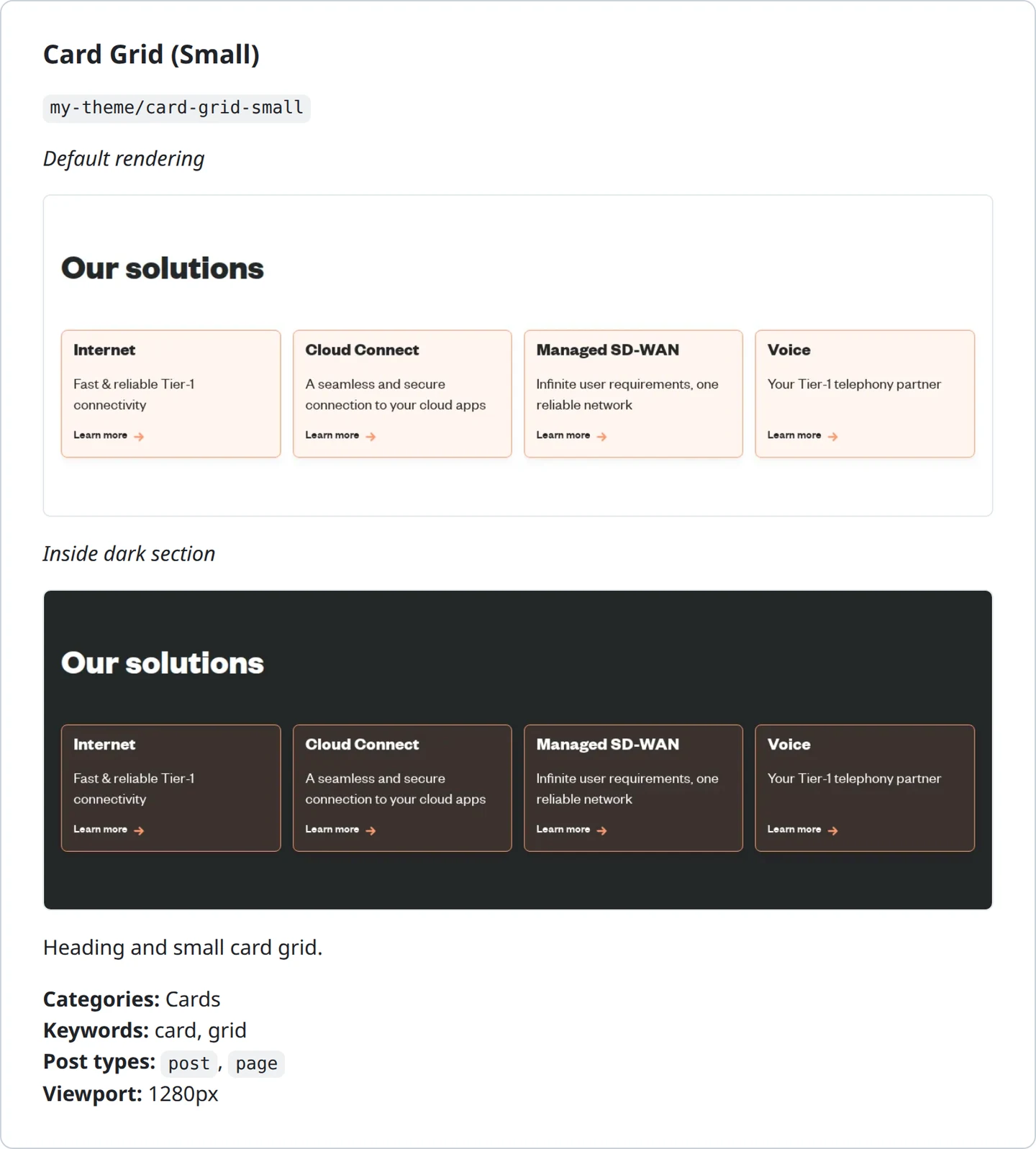
When a pattern has at least one variant image, every image in its section gets a caption — the variant’s label, and baseLabel for the plain capture. A pattern with no variants keeps its single uncaptioned image.
The wrapper is built by the plugin, which accepts a fixed set of group attributes.
Use
appliesTodeliberately. A variant doubles the captures, the capture time and the committed images for every pattern it covers, and some patterns have no second treatment worth showing — a whole-page reference already contains its own sections.
Variants need a site running a plugin version that advertises the feature. An older one is reported as an error rather than silently capturing duplicates.
Grouping categories
By default every registered category becomes one page in the output root. A project with a richer taxonomy can supply classify(), called once per category, returning where it belongs — or nothing, to drop it:
classify: ( { slug, label } ) => {
	// A cross-cutting category of whole-page references, which should also lead
	// each section page rather than sitting in the list.
	if ( slug === 'full-page' ) {
		return { kind: 'reference', dir: 'references', label: 'Full page', leadsIn: 'section' };
	}

	if ( label.startsWith( 'Component - ' ) ) {
		return { kind: 'component', dir: 'components', label: label.slice( 12 ) };
	}

	return { kind: 'section', dir: 'sections', label };
}
| Return key | Purpose |
|---|---|
kind |
Groups pages under headings on the index. |
dir |
Directory the page is written to, relative to outputDir. |
label |
Page title and index link text. |
leadsIn |
Promotes this category’s patterns to the top of every page of the named kind. |
description |
Optional paragraph under the page heading. |
Category slugs are commonly namespaced (my-theme/hero). The separator is flattened in filenames, so a slug can’t write into a subdirectory and bypass the placement classify() asked for.
Every project I’ve worked on organises its patterns differently, which is why this is a function rather than a setting.
Troubleshooting
Missing required configuration: siteUrl. The three required values come from the environment, and an empty string counts as unset. If you exported them in a different shell, they aren’t set here.
Authentication failed (HTTP 401). In order of likelihood: the user doesn’t hold view_pattern_library; the application password is wrong; you’re on multisite and the role is on a different site; or the password lost its spaces — they’re part of the value, so quote it.
The browser is not authenticating (HTTP 401). The manifest fetch worked but the browser probe didn’t, which narrows it to the browser path. Usually the site’s plugin is too old to send the WWW-Authenticate challenge. A 403, or a redirect to a login screen, is more likely an access proxy.
Expected JSON but got text/html. The error prints the first 200 characters of the response, which usually identifies the culprit — a login page, a 404, a maintenance page, or a cached response.
Manifest version 2 is not supported. The site’s plugin is newer than the CLI, or the reverse. Update whichever is behind.
Screenshots are blank. Scroll-triggered animation. Add a handler to animations.
Fonts look wrong. The capture waits for document.fonts.ready, so this is almost always a font that didn’t load at all. Check the missing-resources section of the run summary.
Every screenshot is rewritten on every run. Something genuinely differs each time — live content in a query loop, a rotating hero image, a timestamp. Exclude those patterns or give them stable content.
Captures are slow. Filter to what you’re working on, check whether variants is doubling your capture count, and in CI use the Playwright container image.
Images are too large to commit. Lower imageQuality, switch imageFormat to avif, narrow variants, or point outputDir somewhere published rather than committed.